SafeSight: AI safety monitoring on the CCTV you already have.
SafeSight alerts your team to missing hard hats and vests, people in restricted zones and hazards left in the wrong place, within seconds, from a box on your premises. Footage never leaves your site.
How it fits your site
Your site
- Your CCTV camerasThe ones already on your walls
- Your NVRRecords as it does today
- SafeSight boxChecks every camera against your rulesWorks with the internet unplugged
- Email to your safety teamWith the snapshot Review screenMark each alert right / wrong
SafeSight reads the same streams your NVR already records. Footage stays inside your site.
What it watches for
Missing hard hat
Checked per person. A violation has to hold for 3 seconds, so a hat taken off to wipe a forehead doesn't raise an alarm.
Vests: detector tested, on-site check in the pilot.
Someone in a restricted area
Draw the zone on the camera view. Walking past is ignored; stepping inside alerts.
Hazards in the wrong place Experimental
For example a drum outside the storage bay. These alerts go to a review queue until you confirm them.
Anything new you describe
Type 'ladder' and it starts looking within about 20 seconds, no training. These alerts go to a review queue until you confirm them.
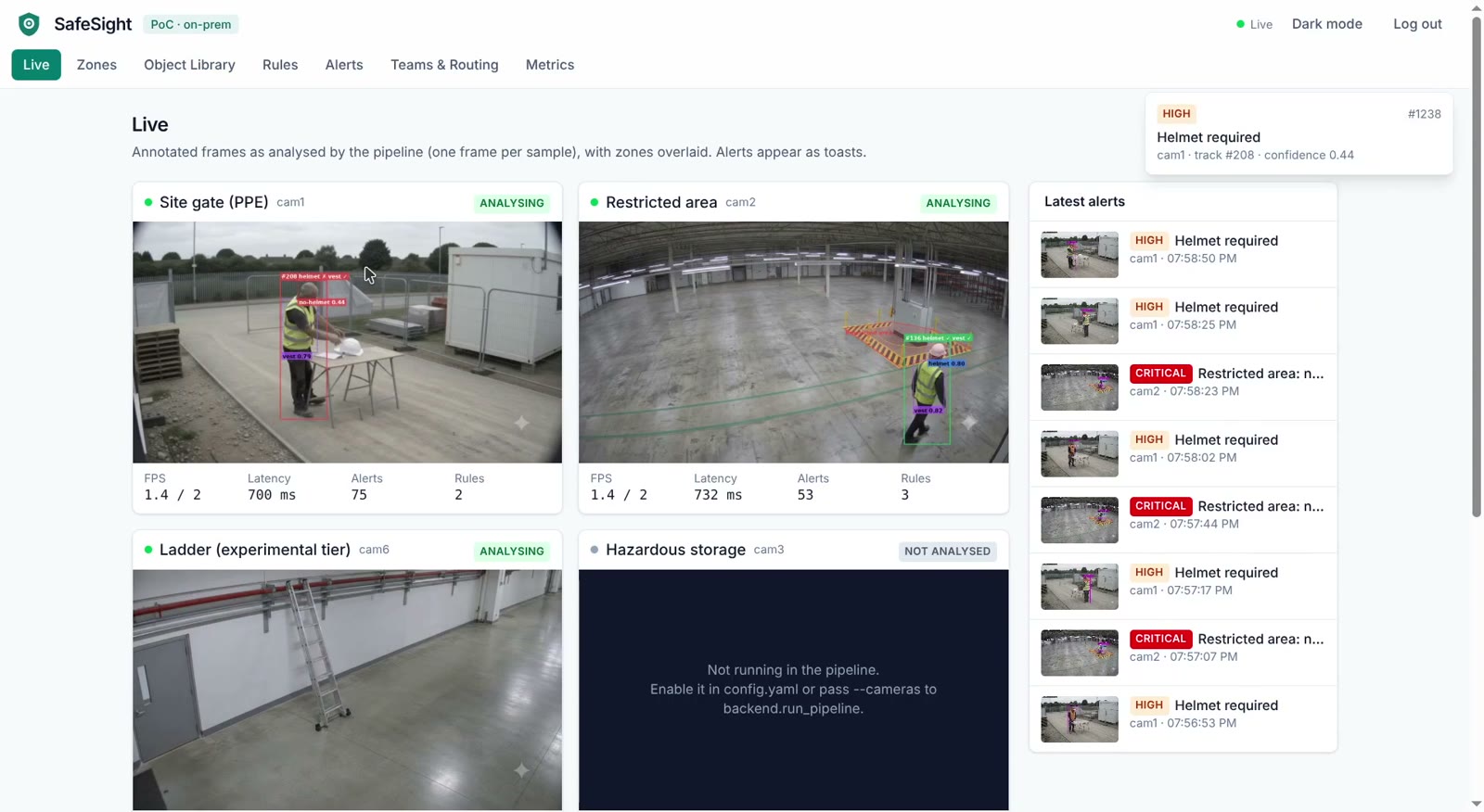
What your safety officer sees
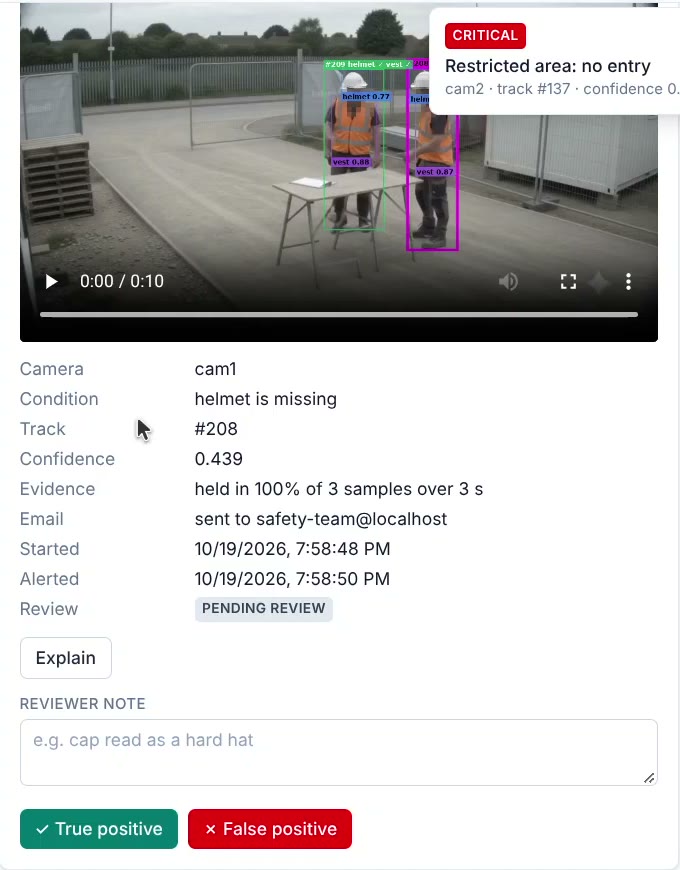
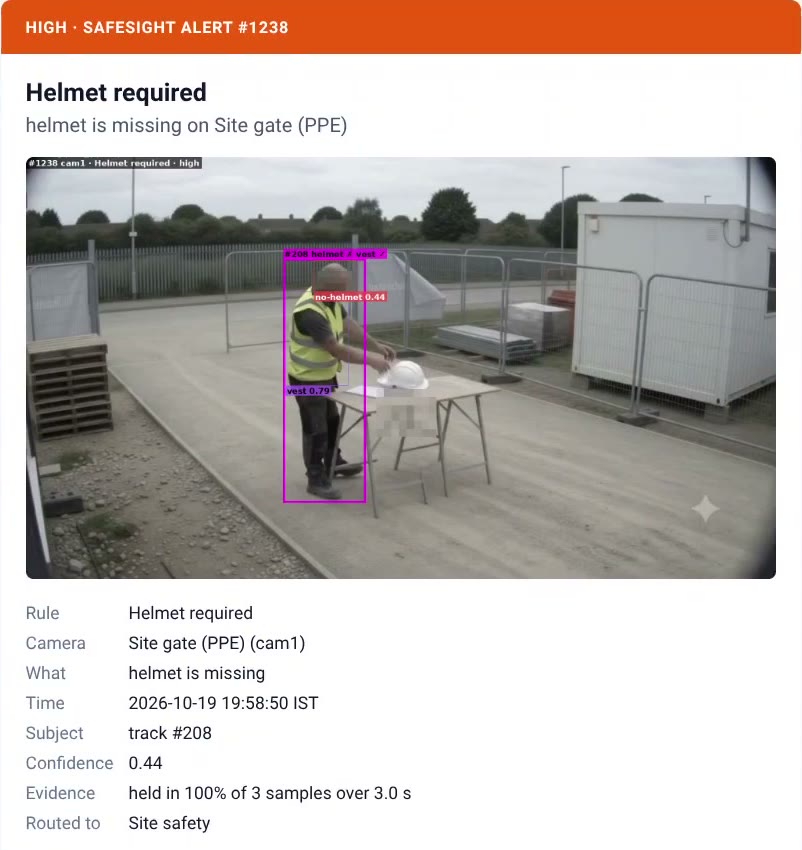
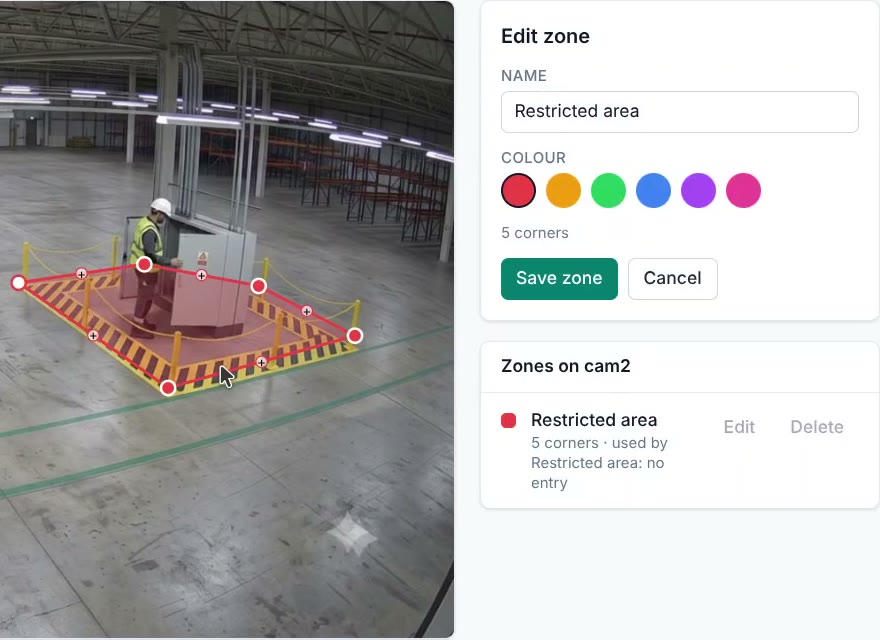
Demo footage is simulated (AI generated) and staged for testing. No real workers or client sites are shown.
What else it can watch
SafeSight isn't only a helmet checker. It can watch for almost any safety rule you can see on a camera.
- Hard hats
- People in restricted zones
- Rule and zone changes applied live, without a restart
- Ladders, drums, pallets or boxes left in an aisle
- Anything you can name
Alerts go to a review queue until you confirm them.
- Manufacturing
- Gloves or goggles at a machine; a person inside a machine guard zone. Ask us.
- Warehouses
- People in forklift aisles; blocked fire exits; standing at a dock edge. Ask us.
- Chemical and pharma
- Containers outside bunded areas; a person in a hazardous store. Ask us.
- Construction (later)
- Helmets at height; people near an open edge. Ask us.
If a person can spot it on a CCTV screen, we can usually teach SafeSight to spot it. The pilot measures how well.
How an alert reaches your team
Your existing cameras stream to a SafeSight box on site (RTSP, the same feed your NVR uses).
It checks each camera 1.5 to 2 times a second against your rules.
When a rule is broken, the alert is saved with a snapshot (faces blurred), a 10-second clip, the time and the confidence.
An email with the snapshot goes to the team that rule is routed to. You can mark each alert right or wrong, and your accuracy numbers update.
Change a rule or a zone, and it applies in about 2 seconds. No restart.
Built for privacy, not surveillance
- Runs on a machine at your site. It keeps working with the internet unplugged.
- No face recognition. No identifying people. Faces are blurred in saved snapshots.
- Evidence is deleted after a retention period you set (7 days by default).
- Built on open-source software, so you're not locked in to one vendor.
See it work
Demo footage is simulated (AI generated) and staged for testing. No real workers or client sites are shown.
Honest numbers
Measured in our proof of concept. Your cameras are measured in the pilot.
What it gets wrong
A baseball cap or beanie can be read as a hard hat, so that worker is missed. We tested a quick threshold fix. It caught some caps but raised false alarms on real helmets, so we didn't ship it. The fix is retraining with caps labelled correctly. It's the first item of every pilot, and it's measured on your cameras.
SafeSight results measured in our proof of concept (October 2026) on simulated footage and a public test image set, on one Intel laptop. Results on your cameras are measured during a pilot.
What's next
- Testing at night and on infrared cameras.
- More cameras per box, with a graphics-card version.
- User roles, for teams and several sites.
Pilot clients help decide the order.
What you need
- CCTV cameras that give an RTSP stream (most NVRs do). Fixed cameras work best; it hasn't been tested on moving cameras, outdoors in rain, or at night.
- One Intel mini PC or laptop-class machine per 2–3 cameras (tested: Intel Core i5, Iris Xe graphics, 16 GB RAM, no graphics card). Yours, or we supply one.
- Email on your network for alerts (optional).
- No cloud account. No internet connection needed to run.
Start with a pilot
Two or three of your cameras. Four weeks. Your rules. A weekly report, and a final report with the error rates measured on your own footage.
After the pilot, an annual fee. No monthly subscription; hardware isn't included. For pricing, send a message on WhatsApp: tell me how many cameras and which rules, and I'll quote for your site.
Questions
Does footage go to the cloud?
No. SafeSight runs on a machine at your site and works with the internet unplugged.
Does it recognise faces or identify workers?
No. It checks safety rules only. It detects faces only to blur them in saved evidence. It never matches a face or stores who someone is.
Will it work with our cameras?
If your cameras or NVR provide an RTSP stream, SafeSight can read it. Accuracy depends on camera angle, distance and lighting, which is why we start with a pilot on your cameras.
How many cameras can one box handle?
We've tested 3 cameras on one laptop-class machine at about 1.5–2 checks per second each. Larger sites use more boxes or a bigger machine, sized during the pilot.
How do you avoid false alarms?
A violation must hold for 3 seconds in most frames before it alerts. Each person raises at most one alert per rule every 2 minutes. Your team marks alerts right or wrong, and the accuracy numbers come from those reviews.
What happens when a camera goes offline?
SafeSight keeps retrying and reconnects by itself. In our test, every camera was back about 8 seconds after its stream returned. A health page shows which camera is down.
Can we add our own hazards?
Yes. Type a description, for example "ladder", and it starts looking within about 20 seconds. Those alerts are marked experimental and go to a review queue, not email, until you confirm them. Confirmed examples become training data for a more accurate version.
Does it work at night?
It hasn't been tested at night or on infrared cameras yet. If you need that, we test it in the pilot.
Tell me which safety rule you most want watched.
Send it on WhatsApp. I reply within a working day.
WhatsApp Navin