Keep your Excels. We turn them into alerts, owners and action.
The operations layer for plants that run on an ERP and a ring of Excel sheets. It reads the files you already keep, applies your rules, and gives every red flag an owner and a due date.
The data is there. The follow-through isn't.
Your ERP holds the transactions. Planning, follow-up, expiry tracking, breakdown logs and training records live in Excel, on paper and on WhatsApp. That's where things fall through.
A machine stops.
Seniors hear hours later, or not at all.
A raw material runs short
on the day the batch is due.
A supplier's certificate expires
before anyone notices.
An SOP changes,
and the operators are never retrained.
Actions agreed in meetings
have no owner and no date.
An auditor asks for a training record.
Someone searches Excel matrices and files of signed forms.
One layer that reads, decides and acts
It sits on top of the tools you already use. Nothing is ripped out.
Your ERP exports and the Excels around them. SOPs, certificates and agreements. Breakdown reports by QR from the shop floor. Training sessions and scores.
Your KPIs and thresholds. Your escalation policy, minute by minute. Your SOP rules: pass marks and retraining windows. Clause-by-clause checks on new SOP versions.
Every red flag gets an owner and a due date. Seniors are told when nobody acts. It warns who isn't qualified to run a line, and hands back a clean ERP upload file.
Rules, not guesswork: every alert says which rule fired and why.
Every leader's numbers, each with a name against it
Not a dashboard that turns red. Each number has an owner, a target and the records behind it.

An owner on every numberA named person who acts, not a red tile that starts a meeting.
Rule-based insightsPlain sentences: what is wrong, by how much and why.
One click to an actionAny number becomes an owned, dated issue that escalates if it goes overdue.
Fresh or stale, you knowEach number shows when its source file was loaded, and turns amber when the file is out of date.
See the shortage on day 0, not on day 4
A 14-day projection for every material: released stock, planned batches, PO receipts on their expected dates, and safety stock. Stock in QC quarantine is shown, but not counted as usable.

The numbers it tracks
| KPI | In plain words |
|---|---|
| Raw-material shortage risk | Day-by-day balance for 14 days. Quarantined stock and late POs are not assumed. |
| Supplier OTIF | PO lines delivered on time and in full, supplier by supplier. |
| Plan adherence | Batches finished on time and in quantity, against the plan. |
| Machine downtime | Hours down on critical equipment; it climbs live while a machine is down. |
| QC release cycle | Days from batch completion to QC release: the hidden lead time. |
| Customer OTIF | How your customers score you: sales lines shipped on time and in full. |
| Inventory value at risk | Value of lots with expiry or retest coming up in 90 days. |
| Overdue actions | Open issues and actions past their due date, by owner. |
Targets and thresholds are settings, not code. Change one and everything recomputes. "No data" is shown as "No data", never as zero.
Prove every operator is qualified, in seconds
Training management (LMS) built from your own training SOP: your pass mark, retraining windows, refresher cycles and form numbers. Your signed forms stay the official GMP record.
| The auditor asks | Today | With ConfluxaaOne |
|---|---|---|
| Was this operator trained on the current version, and did they pass? | Search Excel matrices and files of signed forms. | One matrix: every person × every topic, colour-coded with the reason. Their training record prints in a click. |
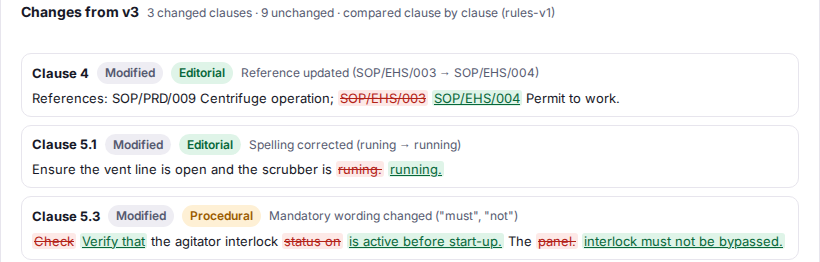
| This SOP was revised. Who must be retrained? | A list made by hand. People get missed. | The new version is compared clause by clause. QA decides, and everyone affected is put on retraining at once, by name. |
| Someone failed the test. What happened next? | Retraining slips. Nobody outside HR knows. | Retraining inside your SOP's window. A second fail marks them Not qualified, gives their head of department an action and tells the plant head. |
| Are new joiners and returners cleared to work? | Induction, TNI, OJT and STC tracked on paper. | Induction, training-need identification, on-the-job training and self-training after long leave, tracked to the day, on your form numbers. |
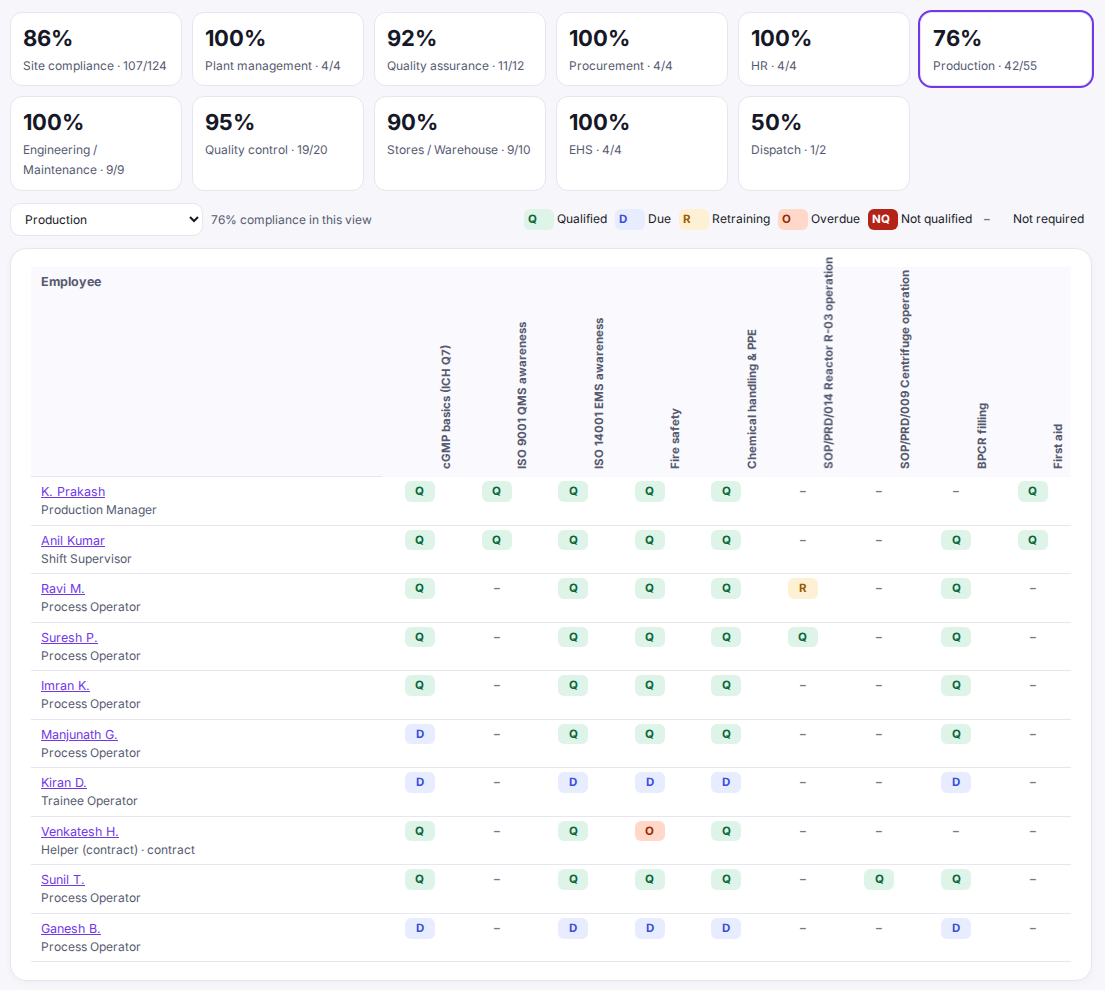
Qualification matrixEvery person × every topic, with the reason for each status. Requirements follow the role and the machine.
SOP revision → retrainingClauses compared, QA decides, the people affected are named the same day.
Tests and retrainingYour pass mark, retraining window and second-fail rule, applied the same way every time.
New joinersInduction, TNI, OJT plan and evaluation before the job description becomes effective.
Leave and trainersSelf-training certification after long leave. Trainers never certify themselves.
Annual plannerPlanned vs held, month by month, with catch-up and refresher checks.
One breakdown, every team in the loop
The modules share one data model, so one event flows through all of them. A chain from the demo plant:
Reactor R-03 stops. The operator scans its QR code and reports it in 3 taps.
Nobody acknowledges. The plant head is alerted at 15 minutes, the MD at 4 hours.
The batch due on R-03 is at risk, and its key raw material falls below safety stock on day 4.
That material's supplier has a GMP certificate expiring in 21 days. The approved alternate is named.
The root cause changes an SOP. Both R-03 operators become due for retraining; one fails again and is marked Not qualified.
The plant head sees "2 operators on R-03 not qualified". Every item has an owner.

Seven modules, one data model
Start with one. Each module you add makes the others smarter.
Operational Intelligence
KPIs, drill-downs to the records, rule-based insights.
Training
Matrix, sessions, planner, new joiners, STC.
Home
Each leader's first screen, every number with an owner's name.
Breakdowns
QR reporting, live board, escalation by the clock. Closing needs a root cause.
Issues & Actions
Owners, due dates, several actions per issue, overdue escalation.
Documents
Register, expiry alerts at 60, 30 and 0 days, versions, SOP change detection.
Data
Excel import and cleaning, freshness, and a file in your ERP's upload format.

Why not another dashboard?
| BI dashboards | A new ERP module | Excel + WhatsApp | ConfluxaaOne | |
|---|---|---|---|---|
| Sees the Excels around your ERP | Only with a data team | Its own data only | Yes, scattered | Yes, cleaned, with freshness |
| Makes someone act | Shows red | Within its module | Depends on who calls | Owner, due date, escalation by the clock |
| Knows your SOP rules | No | Generic | In people's heads | Your pass mark, retraining, gating |
| Effort to start | Data team, months | New project, new data entry | None, no follow-through | Weeks, on the files you have |
Start alongside. Move in only what hurts.
Read your ERP exports and Excels as they are. QR codes on critical machines. Home screens and alerts for each leader. New work for your team: a 3-tap breakdown report.
Issues and actions replace follow-up sheets. A certificate and SOP register with expiry alerts. The training matrix and planner run beside your paper forms.
Training becomes your main training system, with signed forms kept. Training records, issue and breakdown logs move in.
The rule for every move: the old tool stays until your team says the new way is easier.
What's true today
- All seven modules run in a working demo, on synthetic data shaped like a specialty-chemicals plant, on one laptop with Wi-Fi off.
- A pilot runs on your own files, on your server, inside your network.
- Alerts appear in each person's inbox in the app. Delivery by SMS or email is set up at go-live.
- Not built yet: individual logins and roles, electronic signatures, and online tests. Your signed forms remain the official record.
Start with a pilot
60 minutes: your top pains, and the files behind them.
Sample Excels and ERP exports. Column headers alone are enough to start.
4 weeks, on your real numbers.
What the pilot measures: minutes from a breakdown to a senior knowing, days of warning before a shortage, time to answer an auditor's training question, and hours spent on ERP uploads each week.
After the pilot, an annual fee. No monthly subscription; hardware isn't included. For pricing, send a message on WhatsApp.
Questions
Is this AI?
No. Every insight and alert comes from a fixed rule you can read: the formulas are written down and the thresholds are yours to set. In a regulated plant you want logic you can explain to an auditor.
Do we have to replace our ERP or our Excels?
No. Your ERP stays the system of record and your team keeps filling the same Excel files. ConfluxaaOne reads them as they are and can hand back a clean file in your ERP's bulk-upload format.
Does it integrate with our ERP?
We work from your ERP's exported reports and the Excels around them, and we produce files in its bulk-upload format. We don't promise a direct integration until we've seen what your ERP exposes.
Where does our data live?
On your server, inside your network. The demo runs on one laptop with Wi-Fi off.
Is it GMP or 21 CFR Part 11 compliant?
We don't claim that. ConfluxaaOne plans, tracks and gives visibility; your signed forms remain the official GMP record, and there are no electronic signatures. Making it your main training record later means adding individual logins, an audit trail and access control, and validating it with your QA.
Our Excels are messy and change every month.
That's normal. It finds the real header row, ignores title and totals rows, handles Indian number formats and mixed dates, remembers the column mapping, and shows every skipped row with its reason before anything is used.
Do operators need an app?
No. A breakdown is reported from a QR code on the machine, in the phone's browser, in 3 taps. Training scores are entered by the coordinator from the signed forms, as today, but once.
How is this different from ChaseKaro?
ChaseKaro tracks action items on Telegram for any team. ConfluxaaOne is for plants: it reads your ERP and Excel data, applies your KPI, escalation and SOP rules, and raises the actions itself.
Screens from the ConfluxaaOne demo. The data is synthetic, modelled on a specialty-chemicals plant. No real company, people or products are shown.
1024 has partnered with Confluxaa to build ConfluxaaOne.
Tell me which number you chase every Monday.
Send it on WhatsApp. I reply within a working day.
WhatsApp Navin